Clear face, room to move
Choose one baby with the face, hands, body and feet easy to see. Natural light and an uncluttered background make the result easier to assess.
Photo to baby dance video
Turn one baby photo into a dance with the I’m Yours moves and original song. Preview a real photo-to-video example, then make your own private MP4.
Photo preview uses no credits. Review the photo and price before confirming generation.
AI may change facial and body details. Preview the dance reference and check your finished video before sharing.
Real generated example
The actual uploaded photo and its completed result. Press play to see the dance and hear the original song.
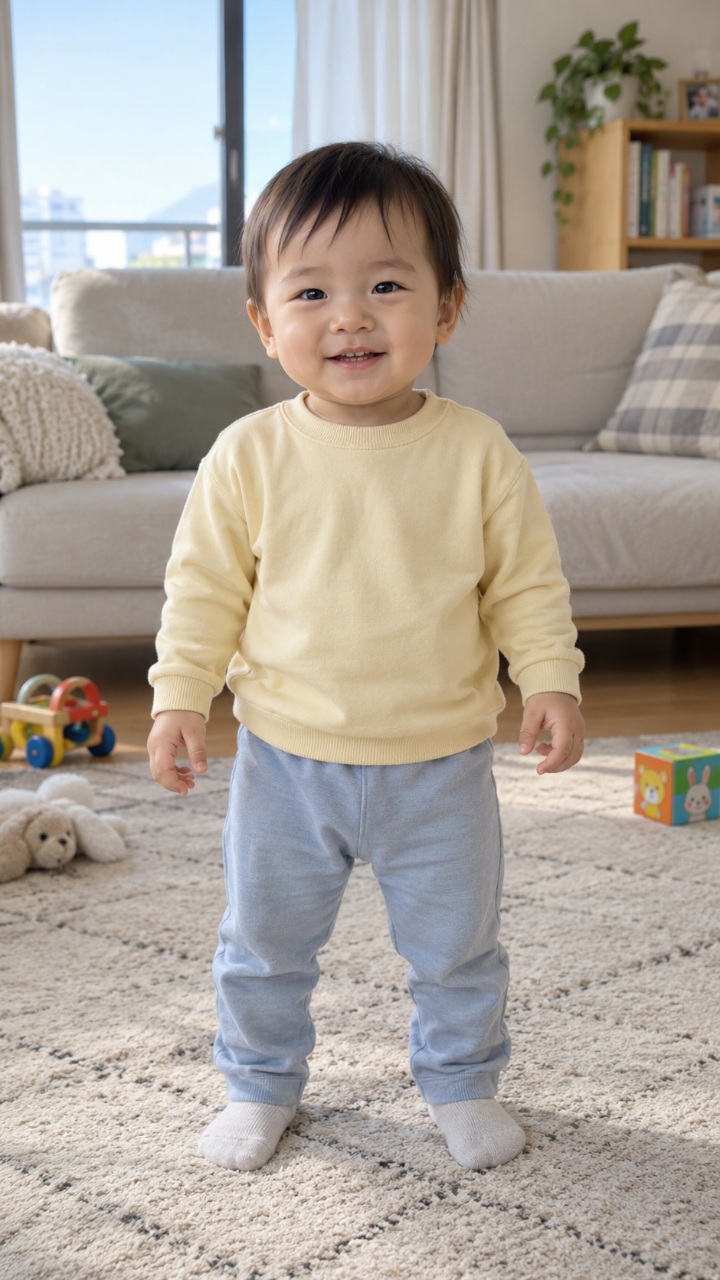
Published with separate owner permission. This is one real AI result; facial detail, hands and movement can vary with your photo.
Choose one fully clothed baby, with a clear face and visible hands, body and feet. Leave space around the baby. We preserve the whole photo; no adult standing-pose crop is applied.
Choose a photo and a dance.
Only you can view your photos and videos.
This authorized video demonstrates the dance. It is a motion reference, not a personalized result. The full 12.9-second movement and original music are preserved.
Use one fully clothed baby with a visible face, hands, body and feet. Leave room for movement; the whole photo and its aspect ratio are preserved.
Sign in, review the prepared photo and credit quote, and confirm that you are the guardian or have guardian permission and photo rights. Generate once; you can return to My creations while it processes.
Open the completed result, enable sound and check the face, clothing and movement. Download the MP4, then choose whether to share a link.
The paired example above uses a clear, fully clothed baby photo with room around the body. You do not need to make your baby pose or actually dance.
Choose one baby with the face, hands, body and feet easy to see. Natural light and an uncluttered background make the result easier to assess.
A standing adult pose is not required. Seated or partly hidden body parts may make movement less predictable. Review the whole-photo preview and advice before deciding to try.
Use a clearer photo if it is heavily blurred, tightly cropped or contains several people. JPEG, PNG and WebP are supported, up to 10 MB; unreadable or unsupported files cannot be processed.
Review the exact photo. Confirm you are 18+ and the baby’s legal guardian, or have that guardian’s permission; the baby must be fully clothed.
Your photo guides the baby’s appearance, clothing and scene. The I’m Yours reference guides the dance and original song. AI can vary facial detail, hands and background as the baby moves.
Each generation uses 35 credits. With no existing balance, the 40-credit pack costs USD 4.99 and covers one video, leaving 5 credits. Credits are reserved when you confirm and used when the video passes its checks.
Browsing and photo preview use no app credits. Packs are one-time purchases. Confirmed failed tasks return reserved credits once; this is separate from a cash refund. Buying credits does not reserve a generation slot.
View credit packsIt turns one authorized photo of a fully clothed baby into an AI dance video. The photo guides appearance, clothing and background; I’m Yours supplies the movement and original song. The current output target is about 13 seconds at 720p for 35 credits. No prompt writing or video editing is needed.
Choose a clear photo of one fully clothed baby with the face and body easy to see. Hands and feet in frame and room around the baby help the dance. Avoid collages, heavy blur, multiple people and hidden body parts.
No adult standing pose is required. The whole photo and its aspect ratio are preserved. A clear face and visible body help; sitting, tight cropping or hidden limbs can make motion less predictable. Review the preview and any advice before confirming.
Yes. The MP4 includes the I’m Yours template’s original soundtrack. You do not need to upload music or edit audio separately. Use the player’s sound control to listen.
The photo supplies the baby’s appearance, clothing and background; the reference supplies movement. AI may change facial details, proportions or parts of the scene. Review the full video before sharing; an identical likeness is not guaranteed.
Browsing the template, watching the public example and previewing a photo use no app credits. Generating your video uses 35 credits at the current price; the confirmation shows the quote. A confirmed failed task returns reserved credits once, separate from a cash refund.
Processing time depends on provider demand and content checks. You can leave the page after confirmation and return to My creations. If a result needs attention, contact support before submitting again.
Yes. Once completed, play and download the MP4 from My creations. The example here is vertical, 720 × 1280. Check the full result and make sure you have permission for the photo, likeness and music and meet the publishing platform’s rules.
Your photos and results are private by default. Only you can access the account result for playback and download. You can create and later revoke a sharing link. The matched example on this page was separately authorized for publication; it does not make other users’ media public.
This baby template currently uses the preset I’m Yours dance and its original music. Custom songs, prompts and uploaded dance references are not offered here. The template catalog lists other tools and their supported subjects.
One authorized photo, the original song and 35 credits. Review your photo before confirming.