Starts muted. Turn on sound to hear the music.
Dance template
K-Pop Hand Dance Generator — K-Pop Sway
An expressive K-pop dance with playful hand gestures and sway.
40 credits per generation · 14.2-second dance reference
Starting with no credits? The Try pack costs USD 4.99 and includes 40 credits, enough for one Sway generation at 40 credits.
Real generated example
Watch the full result
14.134 secStarts muted. Turn on sound to hear the music.
One matching photo14.2 sec40 creditsTemplate music
Make your dance video
Selected template: K-Pop Sway
Photo suggestions for K-Pop Sway
Use a clear, front-facing photo of one adult, showing the head, hands and hips with room to move.
14.2 sec · Original speed · 40 credits · Template audio
Choose a photo and a dance.
Only you can view your photos and videos.
Clear, even light
Upper body · Legs and feet optional
One person
A real photo-to-dance walkthrough
Make K-Pop Sway with your own photo
This is an actual completed website generation: the photo below was its input, and the video beside it is its complete output, shared with permission. Follow the steps to make this dance with your own photo.
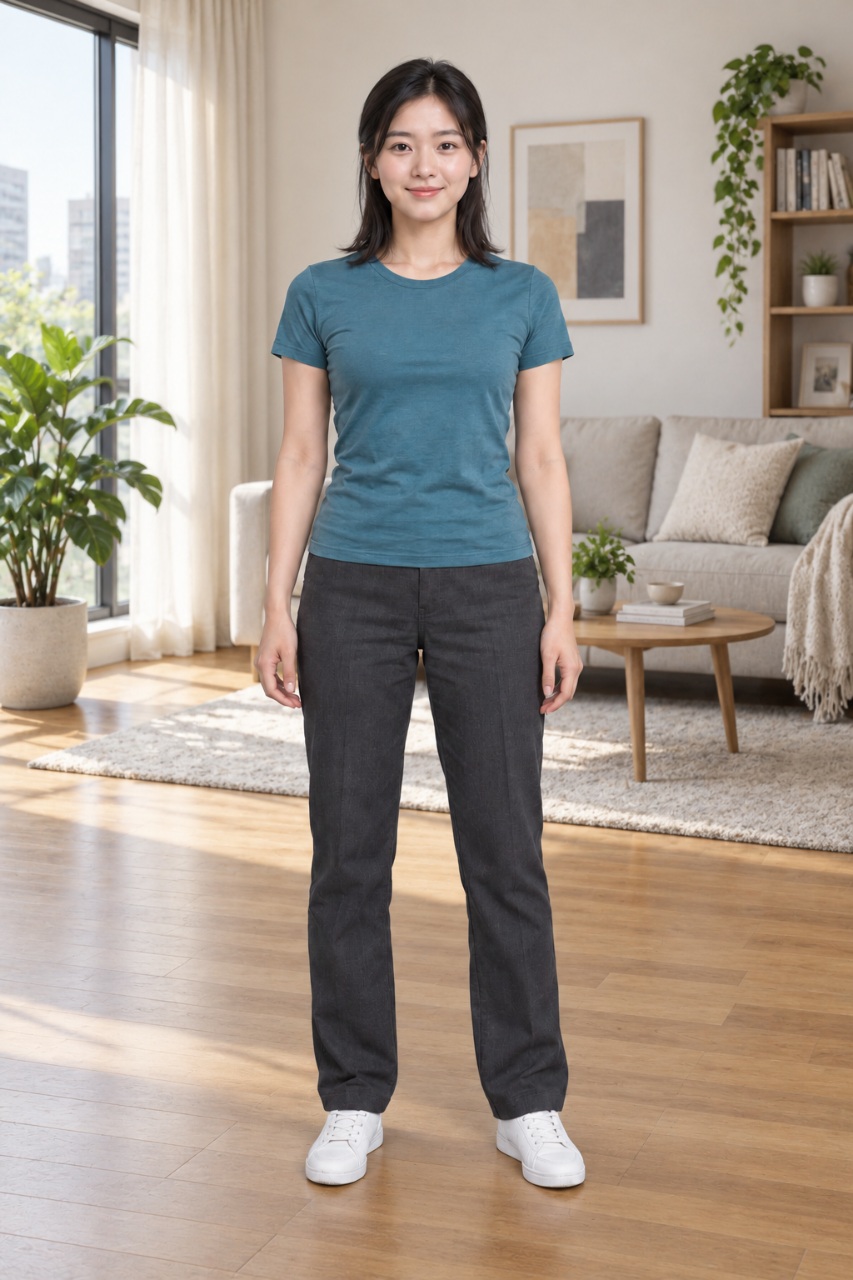
The actual input photo
An upright, near-front pose, clear face and hands, even light and space on both sides. This full-body example works for Sway; legs and feet are optional for this upper-body dance.
Starts muted. Turn on sound to hear the music.
The complete generated result
A web-compressed version of the complete generated video, including the ending and original audio. Open the larger player to watch the complete clip, seek through it and turn on sound.
Open the original generated MP4- Sway reference duration
- 14.2 sec
- This complete sample MP4
- 14.134 sec
- Current generation cost
- 40 credits
The reference and generated sample have slightly different durations. This sample has not been shortened, sped up or cropped for this page. It shows one possible result; appearance, hands, motion and framing can vary with each photo.
From your photo to a downloadable dance
Choose a photo with room for the hands
Use a JPEG, PNG or WebP photo of one adult person. For Sway, a clear, upright, near-front photo showing the head, hands and torso through the hips usually works best. Leave some original background above and beside the arms; avoid a tight face-only selfie.
Compare suitable and unsuitable photosUpload and review the actual input
Upload your photo in the creator above and check its preview on the page. We keep the full image at its original proportions, reducing its size if needed. Quality tips are suggestions. Keep or replace the photo, tick the agreement, then click Generate.
Sign in and check your available credits
Sign in to keep the video in your account. Confirm that you are 18 or older, the pictured person is an adult, and you have permission to animate the photo. Sway needs 40 available credits; use your existing balance or top up if needed.
Confirm Sway and submit once
Check that K-Pop Sway is selected and the displayed cost is 40 credits. Continue through the photo checks, then confirm generation once. Credits are reserved when the task starts. Follow its status rather than submitting the same photo again while the task is pending.
Watch the full clip, then download
Return to My creations to check progress. After the video passes its checks, play the entire result and download the MP4. Check the hands, face and closer ending before sharing. The output retains the template’s original audio; you can replace it in an editor. Confirm the photo and music rights for your intended use.
Open My creations
What does making Sway cost?
The current 14.2-second Sway reference costs 40 wallet credits per confirmed generation. Browsing examples and preparing your photo use no credits. Task credits are reserved first and spent after delivery checks pass.
Starting with no credits? The Try pack costs USD 4.99 and includes 40 credits, enough for one Sway generation at 40 credits.
Use your existing credits if you already have enough. The pack price is a one-time purchase, not a subscription or a guarantee of the same result.
These are one-time credit packs, with no subscription. The listed price buys the whole pack. Check your available balance and current checkout availability before purchasing; returning task credits is separate from a payment refund.
View packs and purchase availability| Pack | Credits | Pack price |
|---|---|---|
| Try | 40 | USD 4.99 |
| Create | 100 | USD 11.99 |
| Creator | 200 | USD 21.99 |
While making your Sway video
Is K-Pop Sway the same as every AI sway dance effect?
This template follows the K-pop hand gestures and swaying movement in the reference shown on this page. Other AI sway effects may use different hip movements or music. Watch this reference and the generated example to choose the dance you want.
Why does Sway need space around the hands?
Sway combines hand gestures, broad arm movements and a closer view near the ending. An image with the hands already against the edge gives the AI less visible scene to work with. Keep the head, hands and hips visible where possible; an upper-body photo does not need to show feet. Limited space is a quality tip, so you can acknowledge it and continue with less predictable results.
What should I check in the finished clip?
Watch from the opening through the closer ending, rather than judging only the poster. Look for clipped hands, changing facial details, unusual fingers, clothing changes or unstable background. The AI follows the reference, but an identical or flawless result is not guaranteed. A clearer or wider photo may improve a new attempt; a new generation needs a fresh confirmation and its own credits.
Does a short Sway clip finish generating in seconds?
The 14.2-second figure is the reference clip length, not a processing-time promise. Queueing, generation, saving and content checks take additional time and may need manual review. You can leave the page and return to My creations. While a task is pending or its status is uncertain, follow that task rather than submitting it again.
Why are credits reserved when I cannot download yet?
Credits remain reserved while generation, delivery checks or additional review are pending. A confirmed failure or rejected result returns the task credits to your available balance; a pending task does not trigger an automatic return. Check My creations and your credit history. If the task stays pending or the balance looks wrong, contact support with the task ID. This is a return of app credits, not an automatic cash refund. Contact support
The dance reference behind this result
Watch dance
14.2 secStarts muted. Turn on sound to hear the music.
This is the motion reference used for K-Pop Sway. The generated example above shows the person from the input photo following this dance.
A complete K-pop dance with expressive hand gestures, swaying and broad arm movements, followed by a closer view toward the ending. The original music and ending are included. A clear upper-body photo with room around the arms works best.
An upright photo showing the head, hands and hips, with room around the arms, works best. Legs and feet are optional. You can acknowledge quality tips and use your current photo.
- Input
- One matching photo
- Format
- Vertical MP4
- Audio
- Template audio included
- Cost
- 40 credits
K-Pop Sway questions
What photo works best for K-Pop Sway?
An upright photo showing the head, hands and hips, with room around the arms, works best. Legs and feet are optional. You can acknowledge quality tips and use your current photo.
How long is K-Pop Sway, and how many credits does it cost?
This complete dance is 14.2 seconds long and currently costs 40 credits per generation. Check the displayed price before confirming generation.
Does my AI dance video include music?
Dance templates include their reference audio. Previews start muted; expand and turn on sound to listen. You can replace audio after downloading. Check rights before publishing or commercial use.
Can I use a custom dance video or a TikTok link?
Current templates include AI Cat Dance Generator, Hand Groove, Footwork Groove, K-Pop Sway, K-Pop Groove, AI Sway Dance, with hand gestures, footwork, K-pop and cat dances. You can switch before confirming. Custom reference-video uploads, TikTok links and text prompts are not supported.
Will my photo-to-dance video match the template exactly?
An identical result is not guaranteed. Templates follow the selected dance reference, but appearance, anatomy and choreography may vary. Watch the completed result before sharing.
How do I turn a photo into an AI dance video?
Choose a dance template, add your photo and sign in. Check the photo preview and credit cost, tick the age and permission agreement, then click Generate. After the video passes its checks, you can play and download it from My creations. No video editing skills are needed.