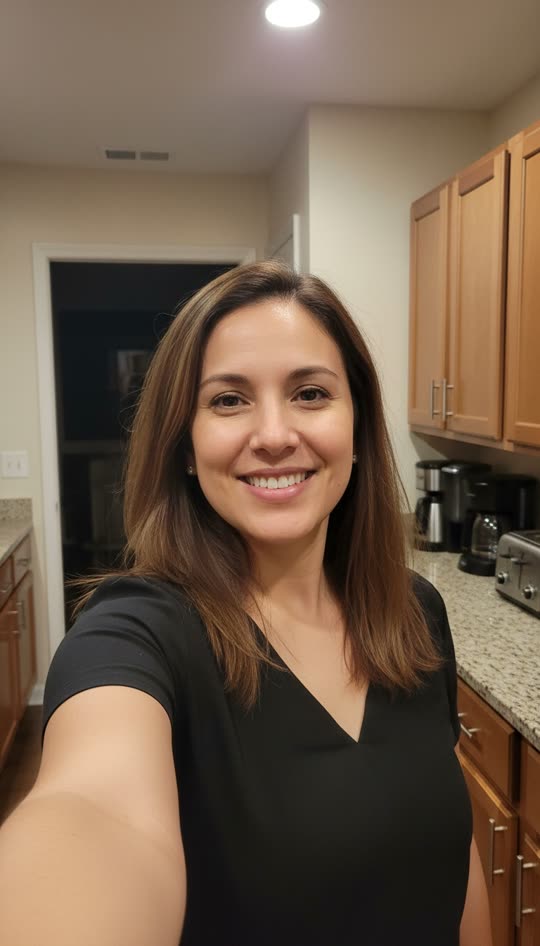
0–2s · an ordinary selfie
Natural blinking and a relaxed smile establish the scene before the ghost enters.
A selfie with unexpected company
Add one selfie. A pale, long-haired ghost appears over your shoulder while you keep smiling. Pick a slow creep or a sudden lunge and make your own short video.
The openings are similar. Compare the final two seconds: Slow creep stays beside the face; Sudden lunge moves the ghost closer to the lens.
Use one adult facing the camera in good light. Include the shoulders and some empty room behind either shoulder; a vertical selfie works best. Avoid mirror selfies, groups, heavy face filters and extremely tight crops. Hands and feet are optional. Preparation keeps the complete photo; AI may recompose it into the portrait output. JPG, PNG and WebP up to 10 MB are supported.
Choose a photo and a dance.
Only you can view your photos and videos.
AI can change facial details, the room and reveal timing. Watch the complete result before sharing. Use an agreed adult photo and reveal the joke promptly.
This format places a fictional ghost behind an ordinary selfie subject. The person seems unaware, so the surprise is in the background. Here, you start with an existing photo and receive a downloadable video. It is an AI-created scene, rather than a live camera effect or a recording of anyone’s real reaction.
Natural blinking and a relaxed smile establish the scene before the ghost enters.
Hair and a pale face emerge over one shoulder, then move beside the cheek. Clear space behind the shoulder helps the reveal.
Slow creep holds the close pose. Sudden lunge moves toward the lens around six seconds. These are reference beats; generated timing may vary.
| Style | Ending | Best fit |
|---|---|---|
| Slow creep | The ghost rises behind your shoulder and stays beside your face. | A quiet reveal for a second look. |
| Sudden lunge | A similar build-up, then the ghost rushes toward the lens near the end. | For viewers who enjoy a jump scare. |
Use one adult facing the camera in good light. Include the shoulders and some empty room behind either shoulder; a vertical selfie works best. Avoid mirror selfies, groups, heavy face filters and extremely tight crops. Hands and feet are optional. Preparation keeps the complete photo; AI may recompose it into the portrait output. JPG, PNG and WebP up to 10 MB are supported.
Each video costs 20 credits. Starting with zero balance, the USD 9.99 pack contains 80 credits: enough for 4 complete videos of this template, with 0 credits left. Existing balance can also be used.
Watching the references is free. Generating your own video uses credits; this tool does not include a free personal preview or a free regenerate. Checkout shows any applicable taxes.
View packs and subscriptionsWatch the complete reference and pick Slow creep or Sudden lunge. Switching styles requires a new photo confirmation.
Review the prepared photo and confirm adulthood and permission. Sign in when prompted so the photo draft can continue in your account.
Check the selected style, credits and balance before confirming. Photo screening and the video task use the normal generation flow. A new generation is a new paid task.
Follow progress in My creations. Review the face, ghost, ending and sound, then download the private MP4. Add an AI disclosure when posting to TikTok, Reels or Shorts.
It makes a 8-second portrait video from one adult selfie, with a fictional long-haired ghost appearing behind the person. The person stays the main subject; the effect does not turn them into a ghost.
This tool generates a video from an existing photo. Download the MP4 and upload it to your chosen platform. Live camera effects, custom video uploads and real reaction recordings are not included.
Use one adult facing the camera in good light. Include the shoulders and some empty room behind either shoulder; a vertical selfie works best. Avoid mirror selfies, groups, heavy face filters and extremely tight crops. Hands and feet are optional. Preparation keeps the complete photo; AI may recompose it into the portrait output. JPG, PNG and WebP up to 10 MB are supported.
Both build a ghost reveal behind the shoulder. Slow creep keeps the ghost next to the face; Sudden lunge adds an approach toward the lens near the ending. Choose the lunge only for people who enjoy a jump scare.
Each video costs 20 credits. Starting with zero balance, the USD 9.99 pack contains 80 credits: enough for 4 complete videos of this template, with 0 credits left. Existing balance can also be used. Watching the references is free. Generating your own video uses credits; this tool does not include a free personal preview or a free regenerate. Checkout shows any applicable taxes.
The output includes the selected reference’s original audio, attached without changing its speed. Custom music and voice uploads are not supported. Keep the sound on when reviewing the ending.
Your photo guides the person and scene, while the video reference guides the ghost. AI may change details or miss the timing. A clear selfie with shoulder space gives it better information. Inspect the complete output before sharing.
Your upload and result are private to your account by default. A public link is created only when you choose to share, and you can revoke it. Generation and screening services process the media under the privacy policy.
Return to My creations to check the original task instead of submitting again. Queueing, processing and additional review can take different amounts of time. Credits stay reserved while the task is pending. If you need help, send support the task ID; do not post your private photo or result link publicly.
Reserved generation credits return to your available balance after a confirmed task failure or rejected result. Credits remain reserved while additional review is pending. Check My creations and your credit history; contact support with the task ID if the balance looks wrong. Returning task credits does not automatically refund a payment.