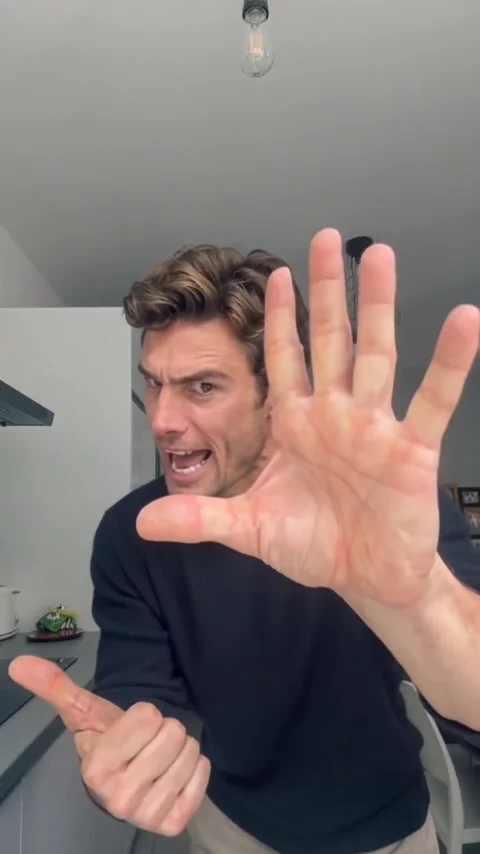
Approach and count
The performer starts farther back, moves closer and taps an index finger on the other hand as if listing complaints.
One photo · A very dramatic argument
Make the person in your photo point at the camera, count on an open palm, turn aside and come back with exaggerated mock-angry expressions. Upload one adult photo; the complete reference supplies the performance and original sound.
Choose one consenting adult in good light, mostly facing forward. A photo showing the face, hands and torso down to the hips gives the model more to work with; legs and feet are optional. Leave room around the arms, avoid a covered face and keep the clothes you want. A neutral expression works: the reference supplies the attitude. Preview the exact prepared photo and read any quality advice before generating.
Choose a photo and a template.
Only you can view your photos and videos.
Sign in, review the actual prepared photo and price, then confirm generation. AI can change facial details and hands; watch the complete result before sharing.
It is a playful argument performed through hands and facial expressions: finger counting, a palm toward the lens, emphatic pointing and a sideways turn. Your photo supplies the adult’s appearance, outfit and background; the fixed reference supplies the movement and timing. The tool makes a new AI video, not a recording of the person actually doing this. No CapCut editing or written prompt is needed.
The performer starts farther back, moves closer and taps an index finger on the other hand as if listing complaints.
An open palm fills the foreground, followed by more pointing and expressive mouth movements. Close hands and partial occlusion are the hardest details to reproduce.
The performer steps back, turns sideways and returns to the camera, ending with raised palms and an exaggerated expression. The complete ending stays in the reference.
Choose one consenting adult in good light, mostly facing forward. A photo showing the face, hands and torso down to the hips gives the model more to work with; legs and feet are optional. Leave room around the arms, avoid a covered face and keep the clothes you want. A neutral expression works: the reference supplies the attitude. Preview the exact prepared photo and read any quality advice before generating.
80 credits per video · First purchase: USD 9.99 for 80 credits · Includes 1 Angry Dance Filter video, with 0 credits left.
Prices above come from the current offers. Pack yield assumes a zero starting balance and using the credits only on this template; existing credits can be used. Video length is not processing time. Queues vary. Failed generations return credits; a card refund is a separate process.
View costsUpload one adult photo, inspect the prepared preview and read the photo advice. Confirm adulthood and permission with the normal photo declaration.
Sign in and check the credits shown for this template. Use your balance or the normal checkout. Press Generate once; the photo goes through the usual content checks before the video is made.
Follow progress in My creations, including after a refresh. When ready, watch the full clip with sound, check the face and hands, then download the MP4. Sharing is optional; label it as AI-generated on the destination platform.
This Angry Dance template is for one consenting adult. Use the dedicated baby, cat, pet or duo tools for those subjects. Photo-quality advice is not proof of age or permission.
The names are used for related argument-dance videos, but the selected clips can differ. This page uses the pointing, palm-counting and sideways-turn reference shown above. Our Bad Times page has its own reference. Watch the complete clip to choose the version you want. This is an independent tool, not an official TikTok or CapCut filter.
The template requests the original reference soundtrack in the finished video. The preview starts muted; turn sound on to listen. Uploading a different song or changing the choreography is not supported by this template. Check sound on your complete result before posting.
No fixed kitchen is promised. Your prepared photo guides appearance, outfit and background; the video guides motion, expressions and timing. AI can change the scene and details. Use a clear photo in a setting you like, then review the result.
80 credits per video · First purchase: USD 9.99 for 80 credits · Includes 1 Angry Dance Filter video, with 0 credits left.
Exact matching is not guaranteed. Hands near the lens, fingers, mouth movements, clothing details and identity during turns can vary. The authorized preview is a motion reference, not proof of this app’s generated quality. Review the complete result before sharing; a completed render is not a promise of perfect likeness.
Your uploaded photo and result are private by default. View and download your own video in My creations. Creating a public share is your choice; sharing is separate from permission to use someone’s photo.
Return to My creations to check the original task instead of submitting again. Queueing, processing and additional review can take different amounts of time. Credits stay reserved while the task is pending. If you need help, send support the task ID; do not post your private photo or result link publicly.
Reserved generation credits return to your available balance after a confirmed task failure or rejected result. Credits remain reserved while additional review is pending. Check My creations and your credit history; contact support with the task ID if the balance looks wrong. Returning task credits does not automatically refund a payment.